ConsoleTable.Text: A Lightweight, Dependency-Free .NET Library
A lightweight .NET library that generates clean, readable and beautifully formatted console tables with almost zero effort.
As developers, we often focus on big architectural decisions, but small quality-of-life details can make a real difference too. One of those details for me has always been how information is displayed in the console.
Whether I am debugging, building CLI tools or creating internal utilities, I kept running into the same problem: I wanted a dead-simple way to print tables that looked clean, readable and professional. Not something that looked dated, broke when content changed or required a lot of setup.
That is why I built ConsoleTable.Text: a lightweight, dependency-free .NET library for creating beautifully formatted console tables with Unicode box-drawing characters, configurable alignment, customizable padding and flexible row layouts. You can now used it directly inside your project using Nuget
Why I built ConsoleTable.Text
I wanted three things from a console table library:
- A simple API
- Beautiful output with clean Unicode borders and strong alignment
- Enough flexibility to support real-world data without becoming complicated
Many libraries solved part of the problem. None solved it in the exact way I wanted.
So ConsoleTable.Text was built around one idea: make console tables look great and require almost zero effort.
What ConsoleTable.Text can do
The library includes the features I tend to need most in day-to-day .NET work:
- Generate formatted tables as plain strings
- Style headers, rows, footers and Unicode borders
- Automatically detect column widths
- Configure cell padding
- Align header, row, and footer text independently
- Clear and reuse table instances
- Cache generated output for better performance
- Support rows with different column counts
That last point is especially useful when dealing with dynamic or partially populated data.
Installation
Package manager
Install-Package ConsoleTable.Text.NET CLI
dotnet add package ConsoleTable.TextPackageReference
<PackageReference Include="ConsoleTable.Text" Version="2.0.0" />You can also find the package on NuGet.
Quick start
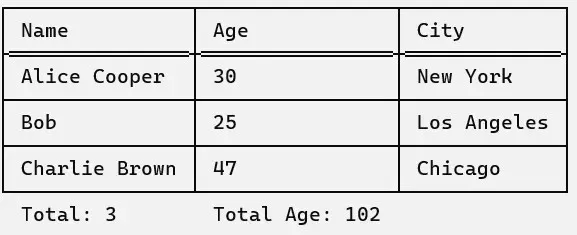
Creating a formatted table only takes a few lines:
using ConsoleTable.Text;

var table = new Table();

table.SetHeaders("Name", "Age", "City");
table.AddRow("Alice Cooper", "30", "New York");
table.AddRows(new string[][]
{
    new[] { "Bob", "25", "Los Angeles" },
    new[] { "Charlie Brown", "47", "Chicago" },
});
table.SetFooters("Total: 3", "Total Age: 102");

Console.WriteLine(table.ToTable());
The result is clean, readable and looks exactly how console output should look in a professional tool.
Inconsistent column counts
One of my favorite features is support for rows with different column counts.
Most console table libraries assume every row has the same number of cells. Real-world data does not always behave that way. Sometimes you want to print a partially filled row, optional values or dynamic structures without adding a lot of custom code around the output.
ConsoleTable.Text handles that gracefully.
using ConsoleTable.Text;

var table = new Table();
table.SetHeaders("Name", "Age", "City");

table.AddRow("Alice");
table.AddRow("Bob", "25", "Antwerp", "Belgium");
table.AddRow("Charlie", "47", "Chicago");
table.AddRow("Jenny", "43");
table.AddRow();

Console.WriteLine(table.ToTable());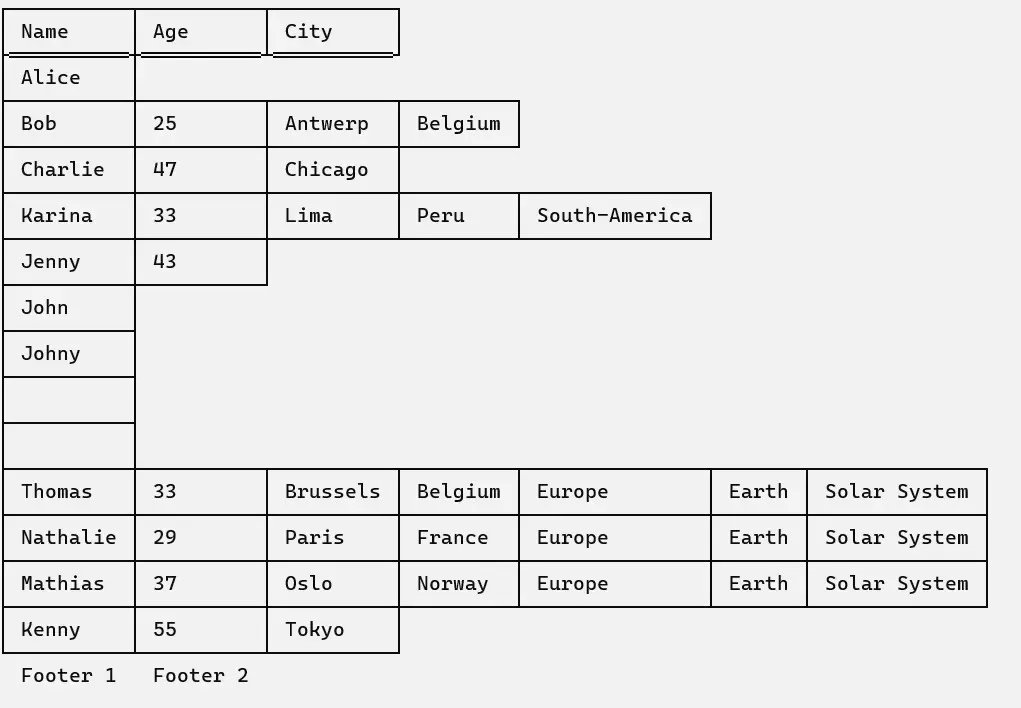
Fluent interface
If you prefer a more fluent style, the API supports that as well:
using ConsoleTable.Text;

var tableString = new Table()
    .SetHeaders("Name", "Age", "City")
    .AddRow("Alice Cooper", "30", "New York")
    .AddRows(
        new[] { "Bob", "25", "Los Angeles" },
        new[] { "Charlie Brown", "47", "Chicago" }
    )
    .SetFooters("Total: 3", "Total Age: 102")
    .ToTable();

Console.WriteLine(tableString);
When you only need one part of a table
Another design goal was flexibility. Headers, rows and footers can each stand on their own.
Header only
using ConsoleTable.Text;

var table = new Table();
table.SetHeaders("Name", "Age", "City");

Console.WriteLine(table.ToString());
Rows only
using ConsoleTable.Text;

var table = new Table();

for (int i = 1; i <= 5; i++)
{
    table.AddRow($"name {i}", (i * 15).ToString());
}

Console.WriteLine(table.ToString());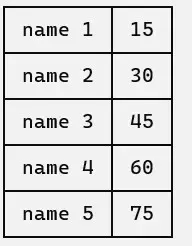
Footers only
using ConsoleTable.Text;

var table = new Table();
table.SetFooters("Total: 3", "Total Age: 102");

Console.WriteLine(table.ToString());
API overview
The core API is intentionally small.
Properties
Headers: The table headersRows: The table rowsFooters: The table footersPadding: The number of spaces around cell contentHeaderTextAlignmentRight: Right-align header text when set totrueRowTextAlignmentRight: Right-align row text when set totrueFooterTextAlignmentRight: Right-align footer text when set totrueCachingEnabled: Cache rendered table output until the table changes
Methods
SetHeaders(params string[] headers)AddRow(params string[] row)AddRows(params string[][] rows)ClearRows()SetFooters(params string[] footers)Clear()ClearCache()ToTable()/ToString()
Want to contribute?
Feature requests, improvements and bug reports are welcome on GitHub:
Final thoughts
ConsoleTable.Text started as a small utility for my own projects and grew into something genuinely useful for anyone working with console output in .NET.
If you build scripts, command-line tools, admin utilities or even just want your debugging output to be cleaner, it is designed to give you professional-looking tables without friction.
You can explore the source code on GitHub or install the package from NuGet.
Thank you for reading.
-Bruno